brew 给 MAC 插上 yum 的翅膀

什么是 brew?
如果你在羡慕 yum、apt-get 给 Linux 系统带来的便捷,不妨装上 brew 。还不明白它是做什么的?brew 全称为 Homebrew,官网( http://brew.sh/ )给它的定位是这样的:
The missing package manager for OS X. Homebrew installs the stuff you need that Apple didn’t.
brew 可以自动解决软件包的依赖关系,方便软件包的安装、更新和卸载。可以称得上是 MAC 系统中的一大神器!
安装
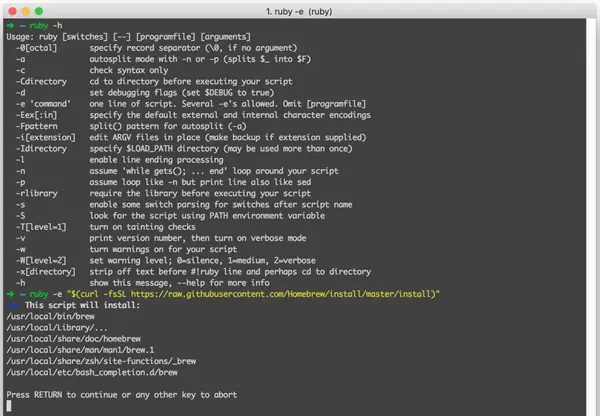
brew 的安装需要用到 ruby,MAC 中已经集成进去了。打开终端,执行命令:
ruby -e "$(curl -fsSL https://raw.githubusercontent.com/Homebrew/install/master/install)"
用法
帮助中说的已经比较清楚了:
➜  ~ brew -h
Example usage:
  brew (info|home|options) [FORMULA...]
  brew install FORMULA...
  brew uninstall FORMULA...
  brew search [TEXT|/PATTERN/]
  brew list [FORMULA...]
  brew update
  brew upgrade [FORMULA...]
  brew (pin|unpin) [FORMULA...]

Troubleshooting:
  brew doctor
  brew install -vd FORMULA
  brew (--env|config)

Brewing:
  brew create [URL [--no-fetch]]
  brew edit [FORMULA...]
  https://github.com/Homebrew/brew/blob/master/share/doc/homebrew/Formula-Cookbook.md

Further help:
  man brew
  brew help [COMMAND]
  brew home
以 p7zip 的安装为例:
➜  ~ brew search 7z
p7zip
➜  ~ brew info p7zip
p7zip: stable 15.09 (bottled)
7-Zip (high compression file archiver) implementation
http://p7zip.sourceforge.net/
Not installed
From: https://github.com/Homebrew/homebrew-core/blob/master/Formula/p7zip.rb
➜  ~ brew install p7zip
==> Downloading https://homebrew.bintray.com/bottles/p7zip-15.09.el_capitan.bottle.tar.gz
######################################################################## 100.0%
==> Pouring p7zip-15.09.el_capitan.bottle.tar.gz
/usr/local/Cellar/p7zip/15.09: 100 files, 4.9M
➜  ~ 7z

7-Zip [64] 15.09 beta : Copyright (c) 1999-2015 Igor Pavlov : 2015-10-16
p7zip Version 15.09 beta (locale=utf8,Utf16=on,HugeFiles=on,64 bits,8 CPUs x64)

Usage: 7z <command> [<switches>...] <archive_name> [<file_names>...]
       [<@listfiles...>]
版权声明:本文为 阡陌 的原创文章,遵循「CC BY-NC-SA 4.0」版权协议。若转载,请附上本文链接及本声明。
本文地址:https://www.mculoop.com/archives/37.html
若对本文有疑问可在评论区留言,我们看到后会尽量解答。