MDK-ARM(Keil)使用 GCC 编译器
MDK 自带的编译器是 ARMCC 或 ARMCLANG(Arm Compiler 6),有时需要使用 GCC 编译器(例如需要使用 GCC 编译的静态库)。当然,用 GCC 不一定非要用 MDK IDE。
先去 ARM 官网下载 GNU 工具链(Arm GNU Toolchain)
Arm GNU Toolchain is a community supported pre-built GNU compiler toolchain for Arm based CPUs.
Arm GNU Toolchain releases consists of cross toolchains for the following host operating systems:
GNU/Linux Available for x86_64 and AArch64 host architectures Available for bare-metal and Linux targets Windows Available for x86 host architecture only (compatible with x86_64) Available for bare-metal and Linux targets macOS Available for x86_64 host architecture only Available for bare-metal targets only
下载地址:
安装后配置 MDK:
Project > Manage > Project Items
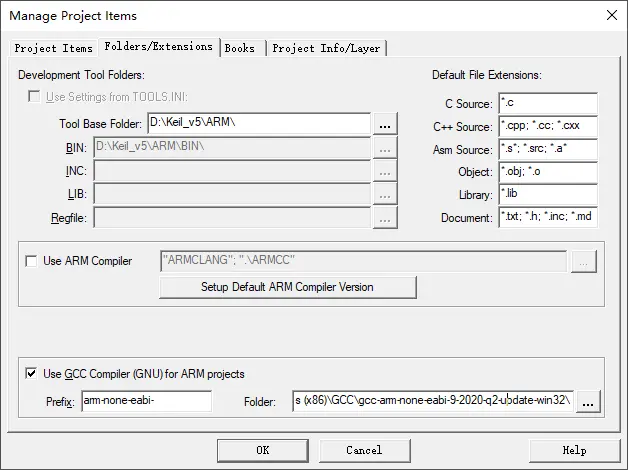
GCC 的文件夹要选择它的根目录。
配置项目:
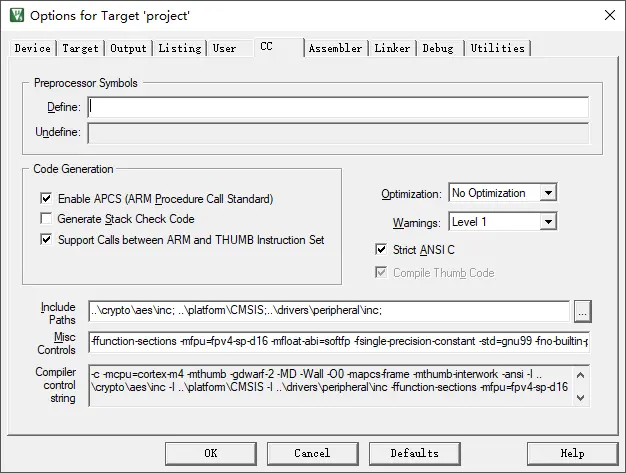
Project > Options for Target
Device 选择正确的器件,会产生 -mcpu=xxx
CC 配置编译相关参数,主要是定义预处理宏、头文件路径、GCC的编译参数等。
Assembler 配置汇编相关参数。
Linker 配置连接相关参数。
不过,既然要用 GCC 不如完全抛弃 MDK 😅,工程管理直接使用 cmake 就挺好的。
版权声明:本文为 阡陌 的原创文章,遵循「CC BY-NC-SA 4.0」版权协议。若转载,请附上本文链接及本声明。
本文地址:https://www.mculoop.com/archives/92.html
若对本文有疑问可在评论区留言,我们看到后会尽量解答。