Qt 5.9 静态编译笔记
静态编译
使用 Windows 系统
1、安装环境要求:
- Supported compiler (Visual Studio 2012 or later, MinGW-builds gcc 4.9 or later)
- Perl version 5.12 or later http://www.activestate.com/activeperl/
- Python version 2.7 or later http://www.activestate.com/activepython/
- Ruby version 1.9.3 or later http://rubyinstaller.org/
2、确保环境变量 Path 中已经加入 Python 、Per、Ruby、D:\Qt\Qt5.9.0\Tools\mingw530_32\bin 的路径。
配置
configure -opensource -confirm-license -static -release \
	-platform win32-g++ \
	-prefix "D:\Qt\qt_5.9.0_mingw32_static_kits" \
	-no-opengl \
	-no-openssl \
	-nomake tools \
	-nomake examples \
	-nomake tests \
	-qt-freetype \
	-qt-libpng \
	-qt-libjpeg \
	-qt-sqlite \
	-qt-pcre \
	-qt-zlib \
	-skip qt3d \
	-skip qtactiveqt \
	-skip qtandroidextras \
	-skip qtcanvas3d \
	-skip qtcharts \
	-skip qtconnectivity \
	-skip qtdatavis3d \
	-skip qtdeclarative \
	-skip qtdoc \
	-skip qtgamepad \
	-skip qtgraphicaleffects \
	-skip qtimageformats \
	-skip qtlocation \
	-skip qtmacextras \
	-skip qtmultimedia \
	-skip qtnetworkauth \
	-skip qtpurchasing \
	-skip qtquickcontrols \
	-skip qtquickcontrols2 \
	-skip qtremoteobjects \
	-skip qtscript \
	-skip qtscxml \
	-skip qtsensors \
	-skip qtspeech \
	-skip qtsvg \
	-skip qttools \
	-skip qttranslations \
	-skip qtvirtualkeyboard \
	-skip qtwebchannel \
	-skip qtwebengine \
	-skip qtwebsockets \
	-skip qtwebview \
	-skip qtwinextras \
	-skip qtx11extras \
	-skip qtxmlpatterns \
	-no-feature-dbus
-skip 选项可以排除 Qt 标准库(standard repository)之外的子模组(Git Submodule),子模组名就是源码目录中对应的目录名。有些子模组会包含多个模块(Qt modules),比如说 qtconnectivity 子模组就包含了 Qt NFC 模块和 Qt Bluetooth 模块。
-feature-<feature> and -no-feature-<feature> 选项用于包含与排除 Qt 基础库(qtbase 库)的特征。qtbase/src/corelib/global/qfeatures.txt 文件中列出了所有的特征。
-qt-<library>、-system-、-no-<library> 选项用于选择使用源码中自带的还是系统提供的第三方库(third-party libraries),或者都不使用。这些第三方库位于 qtbase/src/3rdparty
编译
mingw32-make -j 4
安装
mingw32-make install
修改连接选项
D:\Qt\qt_5.9.0_mingw32_static_kits\mkspecs\win32-g++\qmake.conf
加入 QMAKE_LFLAGS = -static
或
修改 QMAKE_LFLAGS_RELEASE = -Wl,-s 为 QMAKE_LFLAGS_RELEASE = -Wl,-s -static
或
在工程文件中加入 QMAKE_LFLAGS = -static
通过实验来看应该不用修改 QMAKE_LFLAGS_DLL 的值为 -static,暂时还不了解 QMAKE_LFLAGS_DLL 的用途(估计是指链接生成 dll 文件时用的)。
有些时候还需要配置 qt.conf
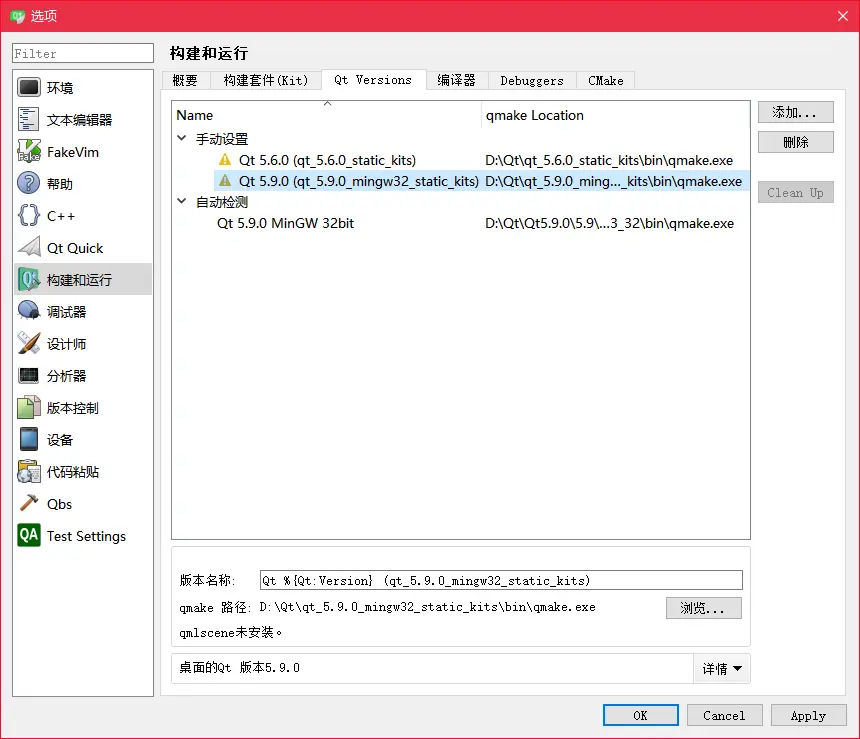
如果编译好的 Qt 库的存放位置发生了变化(与 -prefix 参数所指定的不同),则 Qt Versions 提示“Qt没有被正确安装,请运行make install”,解决方法使在 qmake.exe 目录创建 qt.conf,内容为:
[paths]
prefix = D:/Qt/qt_5.9.0_mingw32_static_kits #当前的实际路径
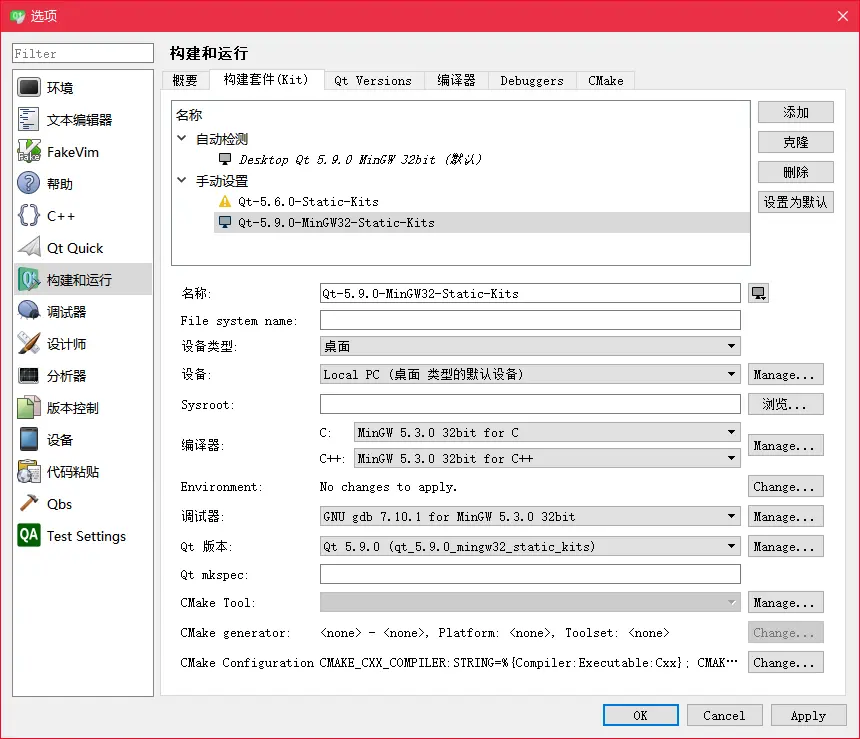
在 Qt Creator 中配置
注意事项
从 Qt 5.7 开始,已经不支持 Windows XP 平台了,运行程序会提示找不到 dwmapi.dll 。如果编译后的程序需要在 XP 系统上使用,需要使用 Qt 5.6 编译。
版权声明:本文为 阡陌 的原创文章,遵循「CC BY-NC-SA 4.0」版权协议。若转载,请附上本文链接及本声明。
本文地址:https://www.mculoop.com/archives/216.html
若对本文有疑问可在评论区留言,我们看到后会尽量解答。